My Calendar

2014年5月19日 星期一

Android 程式開發(三)

           Android 程式開發(三)

上一篇 Android程式開發(二)介紹了Android的UI Components。接下來將會以開發一個BMI程式為例子進行講解。在開始寫BMI程式之前,應該先設計interface。

介面設計

我們從Form Widgets當中選擇兩個TextView,兩個Large Text和一個Button。再來從Text Fields當中選擇兩個 Number (Decimal)。然後將這些UI Components擺放在自己喜歡的地方。TextView是用來顯示文字,Large Text是用來顯示結果,Button是用來計算BMI,Number(Decimal) 則是讓使用者輸入。


然後點擊第一個Edit Text按右鍵,選擇Edit ID,會彈出一個對話框讓我們輸入識別符號,我們在對話框中輸入 『height』當作這個這個UI Component的識別符號。


除了使用 Graphical Layout的方法設定ID,當然也可以使用XML檔進行編輯。現在我們將切換到 『activity_main.xml』將會看到以下的片段。

<TextView
        android:id="@+id/textView2"
        android:layout_width="wrap_content"
        android:layout_height="wrap_content"
        android:layout_alignParentTop="true"
        android:layout_centerHorizontal="true"
        android:layout_marginTop="16dp"
        android:text="身高 (cm)" />

『android:text』是用來顯示文字,而『android:id』和給UI Components的識別符號,每一個介面元件都要有一個ID,主要的用處是為了讓程式可以找到相關的UI Components。以下是完整的activity_main.xml的描述

  <RelativeLayout xmlns:android="http://schemas.android.com/apk/res/android"
    xmlns:tools="http://schemas.android.com/tools"
    android:layout_width="match_parent"
    android:layout_height="match_parent"
    android:paddingBottom="@dimen/activity_vertical_margin"
    android:paddingLeft="@dimen/activity_horizontal_margin"
    android:paddingRight="@dimen/activity_horizontal_margin"
    android:paddingTop="@dimen/activity_vertical_margin"
    tools:context="com.example.bmi.MainActivity$PlaceholderFragment" />

<EditText
        android:id="@+id/weight"
        android:layout_width="wrap_content"
        android:layout_height="wrap_content"
        android:layout_below="@+id/textView1"
        android:layout_centerHorizontal="true"
        android:ems="10"
        android:inputType="numberDecimal" >
    </EditText>

    <Button
        android:id="@+id/submit"
        android:layout_width="wrap_content"
        android:layout_height="wrap_content"
        android:layout_below="@+id/weight"
        android:layout_centerHorizontal="true"
        android:layout_marginTop="26dp"
        android:text="計算 BMI 值" />

    <TextView
        android:id="@+id/suggest"
        android:layout_width="wrap_content"
        android:layout_height="wrap_content"
        android:layout_alignLeft="@+id/result"
        android:layout_below="@+id/result"
        android:layout_marginTop="14dp"
        android:textAppearance="?android:attr/textAppearanceLarge" />

    <TextView
        android:id="@+id/result"
        android:layout_width="wrap_content"
        android:layout_height="wrap_content"
        android:layout_below="@+id/submit"
        android:layout_centerHorizontal="true"
        android:layout_marginTop="19dp"
        android:textAppearance="?android:attr/textAppearanceLarge" />

    <EditText
        android:id="@+id/height"
        android:layout_width="wrap_content"
        android:layout_height="wrap_content"
        android:layout_below="@+id/textView2"
        android:layout_centerHorizontal="true"
        android:ems="10"
        android:inputType="numberDecimal" />

    <TextView
        android:id="@+id/textView2"
        android:layout_width="wrap_content"
        android:layout_height="wrap_content"
        android:layout_alignParentTop="true"
        android:layout_centerHorizontal="true"
        android:layout_marginTop="16dp"
        android:text="身高 (cm)" />

    <TextView
        android:id="@+id/textView1"
        android:layout_width="wrap_content"
        android:layout_height="wrap_content"
        android:layout_alignRight="@+id/textView2"
        android:layout_below="@+id/height"
        android:text="體重 (kg)" />

</RelativeLayout>

將字串抽離XML介面描述檔

為了更好的維護介面,我們可以將『activity_main.xml』檔中的字串抽離。我們可以在 『res』->『values』->『string.xml』中定義我們所需要的字串如下。

    <string name="app_name">BMI</string>
    <string name="hello_world">Hello world!</string>
    <string name="bmi_height">身高 (cm)</string>
    <string name="bmi_weight">體重 (kg)</string>
    <string name="bmi_btn">計算  BMI 值</string>
    <string name="bmi_result">你的BMI值是 </string>
    <!-- advise -->
    <string name="advice_light">你該多吃點</string>
    <string name="advice_average">體型很棒</string>
    <string name="advice_heavy">你該節食</string>
    <!-- other -->
    <string name="action_settings">Settings</string>

定義完成後,要使用所定義的文字我們要使用"@string/"。可以在『Graphical Layout』中選擇『身高(cm)』然後按F2後輸入 @string/bmi_height 。有沒有注意畫面的感嘆號已經消失了。其他在介面所顯示的文字採用一樣的方法進行更換。

2014年4月8日 星期二

Android 程式開發(二)

Android 程式開發(二)


上一篇Android程式開發(一)介紹開發Android程式的工具和前置工作,接下來將討論Android的介面元件 (UI Components)。

在開發Android程式之前,一定要先弄清楚Android有提供那些UI components讓我們使用才能更好的開發Android程式。

Android UI Components

Android提供非常豐富和多樣化的UI components,開啟專案中的『res/layout/activity_main.xml』可以看到預覽畫面和包含Hello World的字串。在左下角有兩個標籤『Graphical Layout』和『activity_main.xml』。在『Graphical Layout』我們可以直接將UI components以drag and drop(拖、拉)的方式進行設定,而 『activity_main.xml』是採用XML檔案描述手機畫面,可以透過修改XML檔進而設計手機畫面。


UI components 根據GraphicalLayout上的分類,共有以下幾種

  • Form Widgets
  • Text Fields
  • Layouts
  • Composite
  • Images and Media
  • Time and Date
  • Transitions
  • Advanced
Android Form UI Components:

名稱 作用
TextView 顯示文字
Button 按鈕
Spinner 下拉選單
CheckBox 勾選鈕

Android Layout Components:


名稱 作用
Linear Layout 線性版面
Relative Layout 相對版面
FrameLayout 框架版面
TableLayout 表格版面

Android DatePicker Components:

名稱 作用
TimePicker 選取時間
DatePicker 選取日期
CalendarView 日曆檢視
AnalogClock 類比時鐘

更詳細的UI components到官網觀看Android UI Components

我們從預覽換面看到『Hello World!』,現在要把它改成『Hello, Android Program』。剛才提到有『Graphical Layout』和『activity_main.xml』描述手機畫面。透過『Graphical Layout』修改,只要點擊畫面中的『Hello World!』然後按 "F2" 就能直接修改文字。透過『activity_main.xml』我們看到如下的XML檔案:
        
<TextView
        android:layout_width="wrap_content"
        android:layout_height="wrap_content"
        android:text="@string/hello_world" ?>
我們只需要將『android:text="@string/hello_world"』改成 『android:text="Hello,Android Program"』就能將文字內容改變了。

Android 程式開發(一)

Android 程式開發(一)

Android 是什麼?
Android 簡單來說就是一個手持式設備(主要是手機)的作業系統平台。

安裝 Android 開發工具
Android的安裝流程可以分為以下兩個步驟 :
  1. 下載並安裝Java
  2. 到Android官網下載Eclipse (已經整合了Android 的套件) 或 Android Studio.(我是採用Eclipse)

Android程式執行前置工作
執行Android程式有兩種方法:
  1. 在Eclipse當中建立一個Android的虛擬機器
  2. 有一台Android 平台的手機 (廢話....)
     建立一個Android的虛擬機器
  1. 在Eclipse上方點選Android Virtual Device Manager                                                                                                  
  2. 點選過後會彈出一個表格然後點選New,接下來輸入虛擬器的名稱,你要的設備,CPU,Memory等等

  3. 設定完成後,就可以執行Android程式了。
     P.S. 個人而言不建議這種做法,因為每次執行虛擬機器的時候都需要等很久,當需要debug
     時真的很浪費時間尤其只有小錯誤的時候(其實是我沒耐心)。所以說既然要寫Android程式
     那不如買一台Android手機吧

     有一台Android手機
     如果你有一台Android手機那就太好了,不管在執行Android程式或者debug的時候都會很方  
     便。
     1. 首先要開啟手機的開發人員選項,然後對USB偵錯模式打勾。(Android 4.2 以上的使用者            官方因為安全因素將開發人員選項隱藏。開啟方法是設定->關於手機->不斷點選"軟體版
         本", 這樣就能開啟開發人員選項了)

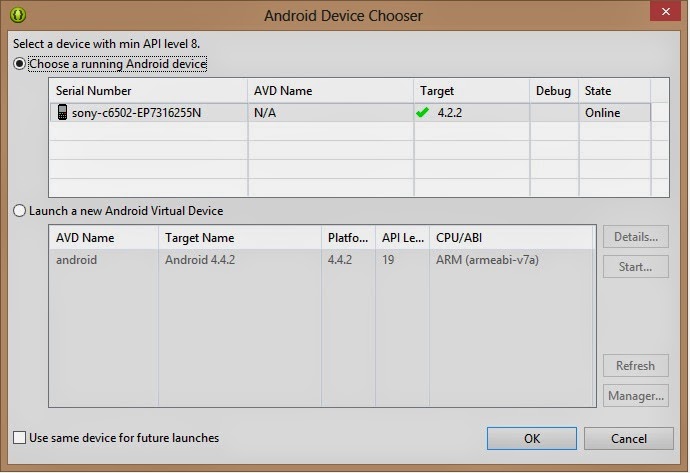
     2.當你執行程式的時候會出現以下的圖,然後選擇 "Choose a running Android device" 就能將
        你所寫的程式在手機執行。


接下來將會討論關於Android手機的介面元件(User Interface Components)


2014年3月4日 星期二

UVa Problem 12403 - Save Setu

UVa Problem 12403 - Save Setu

Time limit: 1.000 seconds

https://uva.onlinejudge.org/index.php?option=com_onlinejudge&Itemid=8&category=16&page=show_problem&problem=3834

Rahaduzzaman Setu, (Roll - 12) of 13th batch, CSE, University of Dhaka is tremendously ill. He has been suffering from Multi Drug Resistant TB for a long time. Now, his left lung is damaged and beyond repair. No medicine is working on his body to ease his pain. It is urgent to operate on his left lung so that the disease doesn’t spread to his right lung. It can either be removed through surgery or transplanted. He comes from a modest family and it is difficult and impossible for them to bare his medical expenses anymore. Because of the money needed (12 million BDT) to transplant, it is his family’s decision to go with the surgery (3 million BDT). We must help them financially by raising money. But we must not be confined with that amount only to do the surgery. We must go for the Transplant. Our target will be to collect as much as possible to help our friend. If anyone wants to contribute now, please send me your contribution or contact me. Please contribute as much as you can to save a life that you saw every week for the first two years of your University life. Please contribute as per your abilities. Our combined effort may save a life. For more information, consult the link below. 

http://supportsetu.com/ 

However, in this problem, you have to build a software that can calculate the donations. Initially the total amount of money is 0 and in each time, two types of operations will be there. 1) ‘donate K’ (100 ≤ K ≤ 105 ), then you have to add K to the account. 2) ‘report’, report all the money currently in the account. 

Input 
The first line of input will contain T (1 ≤ T ≤ 100) denoting the number of operations. Then there will be T lines each containing two types of operations as given. You may assume that the input follows the restrictions above. 

Output 
For each ‘report’ operation, print the total amount of money in the account. 

Sample Input 
donate 
1000 
report 
donate 
500 
report 

Sample Output 
1000 
1500

解題方法: 當 operation 是 donate 將輸字加總, report 就將將總的數字print 出來

import java.util.Scanner;

class UvA12403 {

  public static void main(String[] args) 
  {
      
   Scanner scan = new Scanner(System.in);
   int donations = 0 ;
   
   int n = scan.nextInt(); //insert the numbers of operations
   
   for(int i = 0 ; i < n ; i ++)
   {
    String operations = scan.next();  
    if(operations.equals("donate"))
     donations += scan.nextInt();
    else
     System.out.println(donations);
   } 
 }

}

UVa Problem 621 - Secret Research

UVa Problem 621 - Secret Research

Time limit: 3.000 seconds


At a certain laboratory results of secret research are thoroughly encrypted. A result of a single experiment is stored as an information of its completion: ‘positive result’, ‘negative result’, ‘experiment failed’ or ‘experiment not completed’ The encrypted result constitutes a string of digits S, which may take one of the following forms: 
  •  positive result S = 1 or S = 4 or S = 78 
  •  negative result S = S35 
  •  experiment failed S = 9S4 
  •  experiment not completed S = 190S 
(A sample result S35 means that if we add digits 35 from the right hand side to a digit sequence then we shall get the digit sequence corresponding to a failed experiment) You are to write a program which decrypts given sequences of digits.

Input 
A integer n stating the number of encrypted results and then consecutive n lines, each containing a sequence of digits given as ASCII strings. 

Output 
For each analysed sequence of digits the following lines should be sent to output (in separate lines): + for a positive result - for a negative result * for a failed experiment ? for a not completed experiment


Sample Input 
78 
7835 
19078 
944 

Sample Output 
+
 - 
*

解題方法 : 這題也是非常簡單,只需要根據題目所給的條件實作即可

import java.util.Scanner;
class UvA621 {

 public static void main(String[] args) {
  
  Scanner scan = new Scanner(System.in);

  int n = scan.nextInt();
  
  for(int i = 0 ; i < n ; i++ )
  {
   String encryptedMessage = scan.next();
   if(encryptedMessage.equals("1") || encryptedMessage.equals("4") || encryptedMessage.equals("78"))
    System.out.println("+");
   else
   {
    if (encryptedMessage.endsWith("35"))
     System.out.println("-");
    else if (encryptedMessage.startsWith("9") && encryptedMessage.endsWith("4"))
     System.out.println("*");
    else if (encryptedMessage.startsWith("190") )
     System.out.println("?");
   }
   
   
  }
 
 }

}

UVa Problem 101 The Blocks Problems

Background 

Many areas of Computer Science use simple, abstract domains for both analytical and empirical studies. For example, an early AI study of planning and robotics (STRIPS) used a block world in which a robot arm performed tasks involving the manipulation of blocks.
In this problem you will model a simple block world under certain rules and constraints. Rather than determine how to achieve a specified state, you will ``program'' a robotic arm to respond to a limited set of commands.

The Problem 

The problem is to parse a series of commands that instruct a robot arm in how to manipulate blocks that lie on a flat table. Initially there are n blocks on the table (numbered from 0 to n-1) with block bi adjacent to block bi+1 for all 0 ≤ i < n − 1 as shown in the diagram below:


 Initial Blocks World

The valid commands for the robot arm that manipulates blocks are:
  • move a onto where a and b are block numbers, puts block a onto block b after returning any blocks that are stacked on top of blocks a and bto their initial positions.
  • move a over where a and b are block numbers, puts block a onto the top of the stack containing block b, after returning any blocks that are stacked on top of block a to their initial positions.
  • pile a onto where a and b are block numbers, moves the pile of blocks consisting of block a, and any blocks that are stacked above block a, onto block b. All blocks on top of block b are moved to their initial positions prior to the pile taking place. The blocks stacked above block a retain their order when moved.
  • pile a over where a and b are block numbers, puts the pile of blocks consisting of block a, and any blocks that are stacked above block a, onto the top of the stack containing block b. The blocks stacked above block a retain their original order when moved.
  • quitterminates manipulations in the block world.
Any command in which a = b or in which a and b are in the same stack of blocks is an illegal command. All illegal commands should be ignored and should have no affect on the configuration of blocks.

The Input 

The input begins with an integer n on a line by itself representing the number of blocks in the block world. You may assume that 0 < n< 25.The number of blocks is followed by a sequence of block commands, one command per line. Your program should process all commands until the quit command is encountered.You may assume that all commands will be of the form specified above. There will be no syntactically incorrect commands.

The Output 

The output should consist of the final state of the blocks world. Each original block position numbered i ( 0 ≤ i < n where n is the number of blocks) should appear followed immediately by a colon. If there is at least a block on it, the colon must be followed by one space, followed by a list of blocks that appear stacked in that position with each block number separated from other block numbers by a space. Don't put any trailing spaces on a line.There should be one line of output for each block position (i.e., n lines of output where n is the integer on the first line of input).

Sample Input 

10
move 9 onto 1
move 8 over 1
move 7 over 1
move 6 over 1
pile 8 over 6
pile 8 over 5
move 2 over 1
move 4 over 9
quit

Sample Output 

 0: 0
 1: 1 9 2 4
 2:
 3: 3
 4:
 5: 5 8 7 6
 6:
 7:
 8:
 9:


解題方法:這題最重要的是要明白題意,不會太難。從題目的要求發現可以採用Stack進行實作。


import java.io.BufferedReader;
import java.io.IOException;
import java.io.InputStreamReader;
import java.util.Stack;
import java.util.StringTokenizer;


public class UvA101 {
      public static Stack blocks[];
      public static int[] position;
      public static int numberOfblocks;
      public static String command ="";
      public static int a,b;
    
    public static void main(String[] args) throws IOException{
      // Defined Variable
    
      BufferedReader buf = new BufferedReader(new InputStreamReader(System.in));
      numberOfblocks = Integer.parseInt(buf.readLine());
      blocks = new Stack[numberOfblocks];
      position = new int[numberOfblocks];
      
      for(int i = 0; i < numberOfblocks; i++) {
          blocks[i] = new Stack(); // Initial number of empty stack
          blocks[i].push(i);
          position[i] = i;
      }
      
      while(!(command=buf.readLine()).equals("quit")){
       
       StringTokenizer token = new StringTokenizer(command);
       String aWord = token.nextToken();
          a = Integer.parseInt(token.nextToken());
          String bWord = token.nextToken();
           b = Integer.parseInt(token.nextToken());
       
          if(a==b || position[a]==position[b])
           continue;
      
          if(aWord.equals("move"))
          {
           if(bWord.equals("onto"))
           {
            moveOnto(a,b);
           }
           else if(bWord.equals("over"))
           {
            moveOver(a,b);
           }
          }
          else if(aWord.equals("pile"))
          {
           if(bWord.equals("onto"))
           {
            pileOnto(a,b);
           }
           else if(bWord.equals("over"))
           {
            pileOver(a,b);
           }
          }
          
      }
      
      for(int i = 0; i < blocks.length; i++) 
       System.out.println(answer(i));
    }
     public static void moveOnto(int a, int b) {
        clearAbove(b);
        moveOver(a, b);
     }
     
     public static void moveOver(int a, int b) {
      clearAbove(a);
         blocks[position[b]].push(blocks[position[a]].pop());
         position[a] = position[b];
      }
     
     public static void  pileOnto(int a, int b) {
      clearAbove(b);
         pileOver(a, b);
      }
     
     public static void pileOver(int a, int b) {
      Stack pile = new Stack();
         while(blocks[position[a]].peek() != a) {
             pile.push(blocks[position[a]].pop());
         }
         
         pile.push(blocks[position[a]].pop());
         while(!pile.isEmpty()) {
            int Tmp = pile.pop();
            blocks[position[b]].push(Tmp);
            position[Tmp] = position[b];
         }
      }
     
     public static void clearAbove(int block) {
      while(blocks[position[block]].peek() != block) {
             initial(blocks[position[block]].pop());
          }
      }
     
     /* 
      * Initial the blocks
      */
     
     public static void initial(int block) {   
         while(!blocks[block].isEmpty()) {
            initial(blocks[block].pop());
         }
         blocks[block].push(block);
         position[block] = block;
     }
     
     public static String answer(int index) {
         String Result = "";
         while(!blocks[index].isEmpty()) Result = " " + blocks[index].pop() + Result;
         Result = index + ":" + Result;
         return Result;
     }
  }

UVa Problem 12289 - One-Two-Three

UVa Problem 12289 - One-Two-Three

Time limit: 1.000 seconds

https://uva.onlinejudge.org/index.php?option=com_onlinejudge&Itemid=8&page=show_problem&category=24&problem=3710&mosmsg=Submission+received+with+ID+19897820

Your little brother has just learned to write one, two and three, in English. He has written a lot of those words in a paper, your task is to recognize them. Note that your little brother is only a child so he may make small mistakes: for each word, there might be at most one wrong letter. The word length is always correct. It is guaranteed that each letter he wrote is in lower-case, and each word he wrote has a unique interpretation.

Input 
The first line contains the number of words that your little brother has written. Each of the following lines contains a single word with all letters in lowercase. The words satisfy the constraints above: at most one letter might be wrong, but the word length is always correct. There will be at most 10 words in the input.

Output 
For each test case, print the numerical value of the word.

Sample Input 
3
owe
too
theee

Sample Output 
1
2
3

解題方法 : Input 敘述中提到每個word的長度一定是對的 那首先只要判斷字的長度是 5 肯定就是3. one 和 two 擇一判斷輸入的每個字元是否有兩個或以上的字元相等.


import java.util.Scanner;

class Uva12289 {
 public static void main(String args[]) {
  
  Scanner scan = new Scanner(System.in); 
  int n= scan.nextInt();
  for(int i = 0 ; i < n ;i++) {
   String inputWords = scan.next();
   if(inputWords.length() == 5 )
    System.out.println("3");
   else{
    int cnt = 0 ;
    if( inputWords.charAt(0)=='o')
     cnt++;
    if( inputWords.charAt(1)=='n')
     cnt++;
    if( inputWords.charAt(2)=='e')
     cnt++;
    
    if(cnt >=2 )
     System.out.println("1");
    else
     System.out.println("2");
   }      
  }   
 }

}